An extension for Adobe Premiere Pro
Sunday’s sermon, all week long.
EUNTES finds the strongest moments in your sermon and turns them into clips with subtitles, right inside Premiere Pro.
Fig. 1 — The panel in Premiere Pro
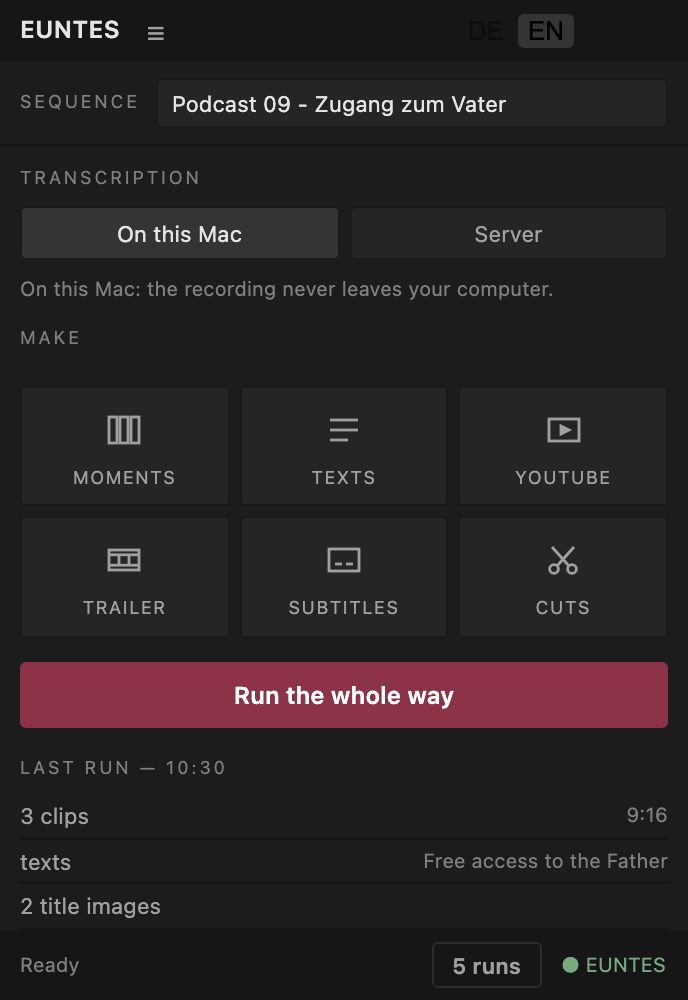
EUNTES finds the strongest moments in your sermon and turns them into clips with subtitles, right inside Premiere Pro.
One button runs the whole process, and every tool also works on its own.
“When God is with us, even in the pit, his love never leaves us.”
54 minutes
“However deep in the well you are, God loves you.”
“God loves you, caves and all”
CBG Gospel Church, preached in German
9:16
with subtitles
Which passages make the cut.
Open the project you already have. There's nothing to upload, convert or prepare.
You get a list of passages, each with a timecode and a reason. Listen through and decide which ones are worth using.
The clip is in your timeline and the copy is in the panel beside it. From there, you edit as you normally would.
By default, the sermon is transcribed on your own computer, so the recording never leaves it. If you'd rather have it faster, switch the panel to “Server”. The audio is then sent to the server, and that's entirely your decision.
| No. | Topic | Details |
|---|---|---|
| 1.1 | No sermon content on our servers | We don't store a single word of it: no files, no logs, no error messages containing it. All we record is when a run took place and how many runs you've used. A sermon recording can reveal the faith of the people in it, and material like that should stay with you. |
| 1.2 | No extra app | EUNTES is an extension that docks inside Premiere Pro. There's no website to upload to and no separate program to keep open. |
| 1.3 | Premiere Pro on Mac and Windows | Runs on Macs with Apple silicon and on Windows 11. On both, EUNTES transcribes the sermon locally. |
All three include the same extension and the same tools. The difference is who pays for the AI analysis, and how often.
10 sermons a month, and you can cancel at the end of any month. Need more on a regular basis? Just let us know.
No subscription: buy runs and use them whenever you like. Credit never expires.
The extension is yours for good, with no ongoing fees from us. You cover the AI costs yourself: you open your own Anthropic account and pay them directly. By our measurements, that comes to roughly 20 to 50 US cents per sermon. We don't add a markup and earn nothing from it.
What counts as a run: one analysis of an entire sermon. Finding moments, cuts and trailers each use one run, as does transcription on the server. Titles, copy, thumbnails and subtitles for the same sermon are free, and so is transcription on your own computer. With a subscription or credit, the AI analysis is included and you don't need an account of your own. With the perpetual licence, it runs through your own account and is billed there. Here's how to set that up. As a small business under § 19 of the German VAT Act (UStG), we don't charge VAT.
No payment details and no commitment. You'll get a key straight away: enter it in the panel and run one of your own sermons.
Mac: about 20 MB, signed and notarised by Apple · Windows 11: about 45 MB
Use the form above. Once you've sent it, your key and download link appear on screen and arrive by email. Double-click the file and follow the instructions, then restart Premiere Pro and open Window ▸ Extensions ▸ EUNTES. On a Mac, the file is notarised by Apple, so you won't see a warning. On Windows, you may see a warning the first time you open it, because the file isn't signed by Microsoft. The manual explains how to install it anyway.
Nothing happens without a licence key, so you can install it first and decide later.
The manual explains each tool in detail: Manual (PDF) · Anleitung (German). After installation, you'll also find it in your Downloads folder.
Only enough to open Premiere Pro and create a project. If someone on your team already records and edits the service, they can use EUNTES. A single button runs the whole process.
By default, transcription happens on your computer. We don't store a word of it. All we record is when a run took place and how many you've used.
This matters: a sermon recording can reveal the religious beliefs of the people in it, which makes it specially protected data.
Yes, on Windows 11. Your download link gives you both versions, one for Mac and one for Windows. On Windows, transcription runs on the CPU: a 35-minute sermon took just under seven minutes on a six-core PC. EUNTES doesn't run on Intel-based Macs.
Good enough to do the first pass for you. The final call is always yours: you see every passage with its timecode and reasoning, listen through and keep what works. If a sermon ever comes back with nothing usable, let us know and we'll refund the run.
Anything that analyses the whole sermon from scratch uses one run: finding moments, cuts and trailers, plus transcription if you send it to the server. Anything that builds on a sermon you've already analysed is free, including titles, descriptions, captions, thumbnails and subtitles. You can search the same sermon for more moments twice at no cost. After that, each additional search uses a run.
No. The runs you buy stay in your account until you use them.
Yes. Enter your own API key and the panel connects to the provider directly, who then bills you. We don't see any of it and earn nothing from it. Read the setup guide.
The language of your sermon. The panel itself is available in English and German, and you can switch between them under “Setup”. So if you use the English panel with a Spanish sermon, you'll get Spanish subtitles.